20,000+ Players

Your Ultimate Valorant Companion

Powering

View live match info, set your agent preferences, track ranks in real time, and stay on top of every match — all in one clean Valorant companion.

Live Match Info Agent Presets Match History Weapon Skins Live Match Info Agent Presets Match History Weapon Skins

Everything You Need
In One Place

01

Immersive Home Screen

A calm, immersive space that brings everything together your PlayerCard, queue controls, live status, and interactive themes, all in one aesthetic view. Designed to feel alive while staying minimal and focused.

Interactive UI Personalized Experience
02

Match Player Overview

Displays the players detected in your current match together with their statistics and profiles.

All Game Modes Live Player Detection
03

Agent Presets

Save your preferred agent for each map so your pick is ready the moment agent select opens. Built for players who already know who they want.

Per-Map Presets Quick Select
04

Match History

Browse any player's complete match history with K/D/A stats, round-by-round timelines, and detailed breakdowns.

Party Insights Round Timelines
05

Player Search

Look up any player by their Riot ID and tag. View their rank, peak rank, and full match history anytime.

Profile Lookup Any Player
06

Customization

Design your identity your way. Customize your PlayerCard with styles, badges, effects, and even a fully interactive backside with bio or video everything saved and ready to showcase in every match.

Deep Customization Player Identity

Weapon Skins

Preview the weapon skins players have equipped in your match.

Share Match Links

Generate shareable links with auto-refreshing live score updates.

Discord Presence

Show your match status live in Discord with rank, agent, and map.

Rich themes

Express your style with elegant themes, soothing color gradients, and a soft ambient glow.

0,000+
Active Players
0K+
Matches Tracked
0K+
Player Searches

Ready to Dominate?

Download VALRadiant now and get more out of every match. Free forever, no strings attached.
Download for Windows
Windows 10/11
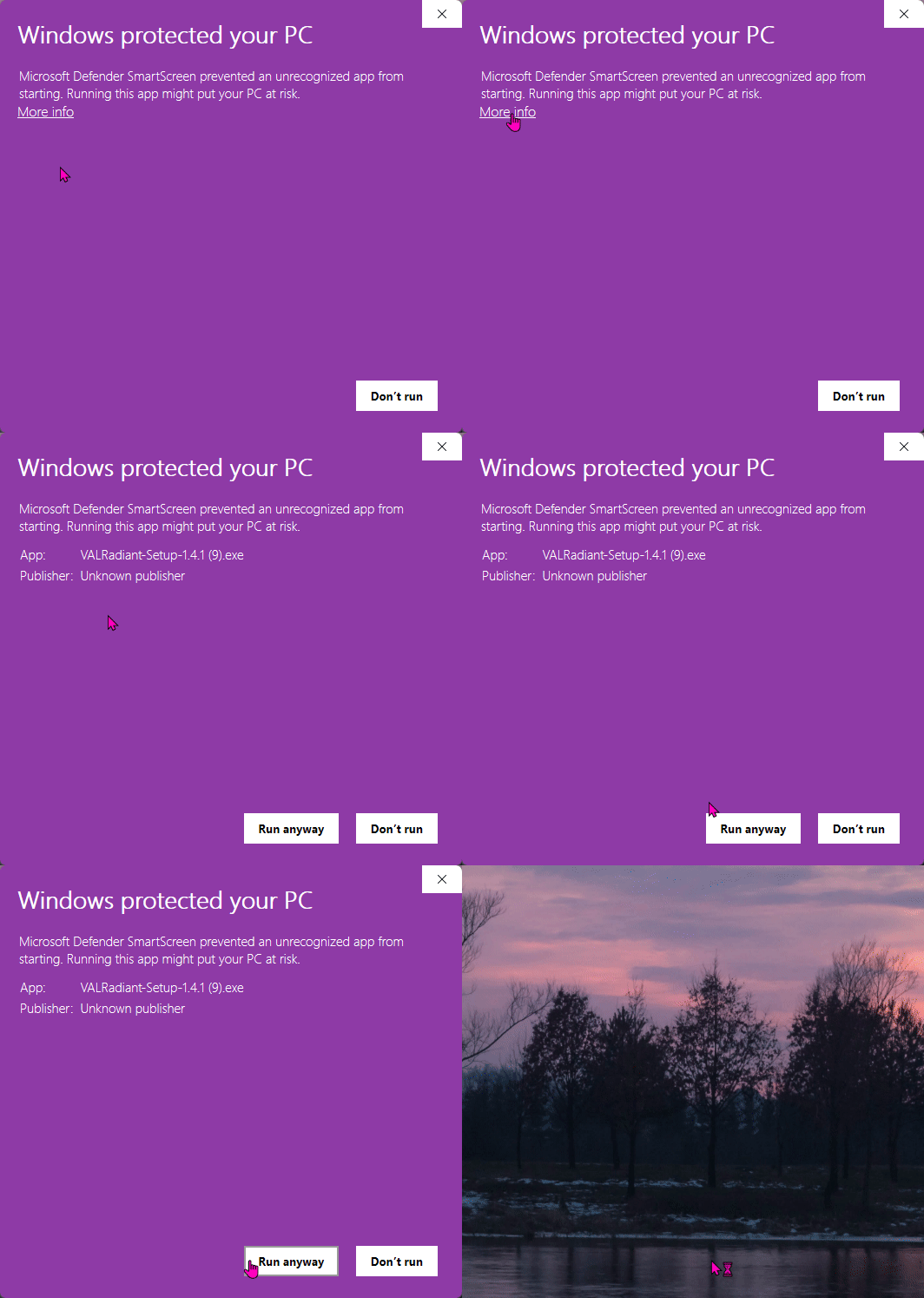
Windows SmartScreen warning dialog
Download in progress

"How to Install the App"?

SmartScreen shows this because VALRadiant isn't on the Microsoft Store. Code signing certificates cost thousands per year -- this is normal for independent software.

1

Click "More info"

Reveals additional options beneath the warning.

2

Click "Run anyway"

The installer proceeds and VALRadiant launches after setup.

Standard for apps outside the Microsoft Store. Even known brands and indie devs encounter this.